AWS (Amazon Web Services) is a cloud platform that lets you rent computing power, storage, databases, networking and security tools over the internet and pay only for what you use. Learning to use it well means understanding a small set of core services, how they connect, and how to run them securely and cheaply. This guide gives you a practical roadmap for doing that, a safe first-environment walkthrough, and a hypothetical banking architecture that shows how the pieces fit together in a regulated industry.
Last reviewed: November 2026. Service names, prices, free-tier terms and exam details change often, so every section links to the official AWS page that should be treated as the source of truth.
Why Learn AWS Cloud?
Cloud computing is the on-demand delivery of IT resources, such as servers, storage and databases, over a network, with usage-based pricing. The US National Institute of Standards and Technology describes it as a model for on-demand network access to a shared pool of configurable computing resources (NIST SP 800-145). For the full background, the tutorial site has a plain-language lesson on what cloud computing really is.
Organisations move to the cloud for practical reasons:
- Speed: a server or database can be created in minutes instead of weeks.
- Elasticity: capacity can grow for a busy period and shrink afterwards.
- Cost model: operating spend replaces large up-front hardware purchases (though poor cost control can erase this benefit).
- Reach: workloads can run close to customers in many geographic Regions.
- Built-in services: managed databases, queues, encryption and monitoring remove a lot of undifferentiated work.
AWS matters because it is one of the largest and broadest cloud platforms, so AWS skills are relevant to developers, system administrators, security engineers, data engineers and architects. But there is a trap: many learners memorise definitions ("S3 is object storage") without ever building anything. Employers and real projects reward a different skill: choosing the right service for a problem, wiring it together securely, and fixing it when it breaks. That only comes from hands-on practice, which is why this guide is built around doing.
What Is Amazon Web Services (AWS)?
Amazon Web Services is a very large catalogue of cloud services, accessed through a web console, a command-line interface (CLI), software development kits (SDKs) and APIs. You create resources, configure them, and are billed for consumption.
Cloud service models: IaaS, PaaS and SaaS
| Model | You manage | The provider manages | AWS example |
|---|---|---|---|
| IaaS (Infrastructure as a Service) | Operating system, runtime, application, data | Physical hardware, virtualisation | Amazon EC2 |
| PaaS (Platform as a Service) | Application and data | OS, runtime, scaling platform | AWS Elastic Beanstalk |
| SaaS (Software as a Service) | Your usage and configuration | Everything else | Amazon Connect (cloud contact centre) |
Most real systems mix all three: for example, an EC2-hosted legacy app, a managed database, and a SaaS email provider.
Regions, Availability Zones and edge locations
- Region: a separate geographic area, such as London or N. Virginia, containing multiple Availability Zones.
- Availability Zone (AZ): one or more isolated data centres within a Region. Spreading an application across two or more AZs protects it from a single-facility failure.
- Edge location: a site used by services like Amazon CloudFront and Amazon Route 53 to deliver content and answer DNS queries closer to users.
At the time of writing, AWS states that its cloud spans 124 Availability Zones within 39 geographic Regions; check the AWS Global Infrastructure page for current numbers. Region choice affects latency, price, service availability and, for banks especially, data residency. The lesson on AWS global infrastructure covers those trade-offs.
Pay-as-you-go pricing
Most services charge for what you use: compute time, storage per GB, requests, data transfer. You can estimate costs before building with the AWS Pricing Calculator.
The Shared Responsibility Model
AWS is responsible for security of the cloud: facilities, hardware and the foundational software. You are responsible for security in the cloud: your data, identities, permissions, configuration, and for services like EC2, the guest operating system and patches. AWS explains the split on its Shared Responsibility Model page, and the tutorial site has a dedicated lesson on the Shared Responsibility Model. Keep this model in mind throughout the rest of the guide, especially in the banking section.
How to Start Learning AWS: A Step-by-Step Roadmap
You do not need to know everything before you start, but a few foundations make everything easier. A sensible order is: fundamentals, accounts and safety, compute and storage, networking, databases, security, monitoring, projects, and finally certifications.

Step 1: Build the prerequisites (1–2 weeks, in parallel)
- Networking basics: IP addresses, CIDR notation, DNS, ports, TCP/HTTP and firewalls. VPC networking will not make sense without these.
- Linux and Windows fundamentals: how to navigate a shell, manage files and permissions, and read logs.
- Basic scripting or programming: Python, Bash, PowerShell, C#, or JavaScript are all useful. You can start AWS without programming, but automation and serverless work will need it later.
Step 2: Understand cloud fundamentals
Learn the models and vocabulary from the previous section. Add the idea of the Well-Architected Framework, AWS's set of design principles across operational excellence, security, reliability, performance efficiency, cost optimisation and sustainability.
Step 3: Create and secure an account, then explore the console
Set up an account with strong protections before you build anything. The tutorial site has a lesson on how to secure your AWS account, and AWS's own IAM best practices are the authoritative reference.
Step 4: Understand the Free Tier and current pricing
AWS's free offering for new accounts has changed in recent years. At the time of writing, AWS's Free Tier page describes a Free plan with credits and a limited set of services, a Paid plan for access to everything, and a set of always-free services within monthly limits. Terms, credit amounts and durations change, so read the current page before relying on them. The lesson on Free Tier and billing covers budgets and the common ways beginners get surprise bills.
Step 5: Learn by building
Follow this beginner-to-intermediate progression:
- Beginner: console tour, IAM users/roles, S3 bucket, a single EC2 instance, a CloudWatch alarm.
- Early intermediate: custom VPC with public and private subnets, load balancer, RDS database, Route 53 record.
- Intermediate: serverless API with Lambda and API Gateway, DynamoDB tables, CloudFormation or Terraform, a CI/CD pipeline.
- Applied: a multi-tier, multi-AZ architecture with security controls, logging, backups and a disaster recovery plan.
Step 6: Use official documentation and training
Use AWS Documentation as your reference, AWS Skill Builder for structured courses, and AWS Workshops for guided labs. The AWS Architecture Center has reference architectures you will use later in this guide. If you want a single ordered curriculum, the tutorial site's learning roadmap lays out a phased path with time estimates.
A note on the tutorial site: the Cloud Engineering Academy at awstutorial.abrarsohail.com is written primarily for experienced C#/.NET developers moving into AWS cloud engineering, with banking-flavoured examples. Its networking, security, database, monitoring and architecture modules are useful to any learner, but some code lessons assume .NET.
Essential AWS Services Everyone Should Understand
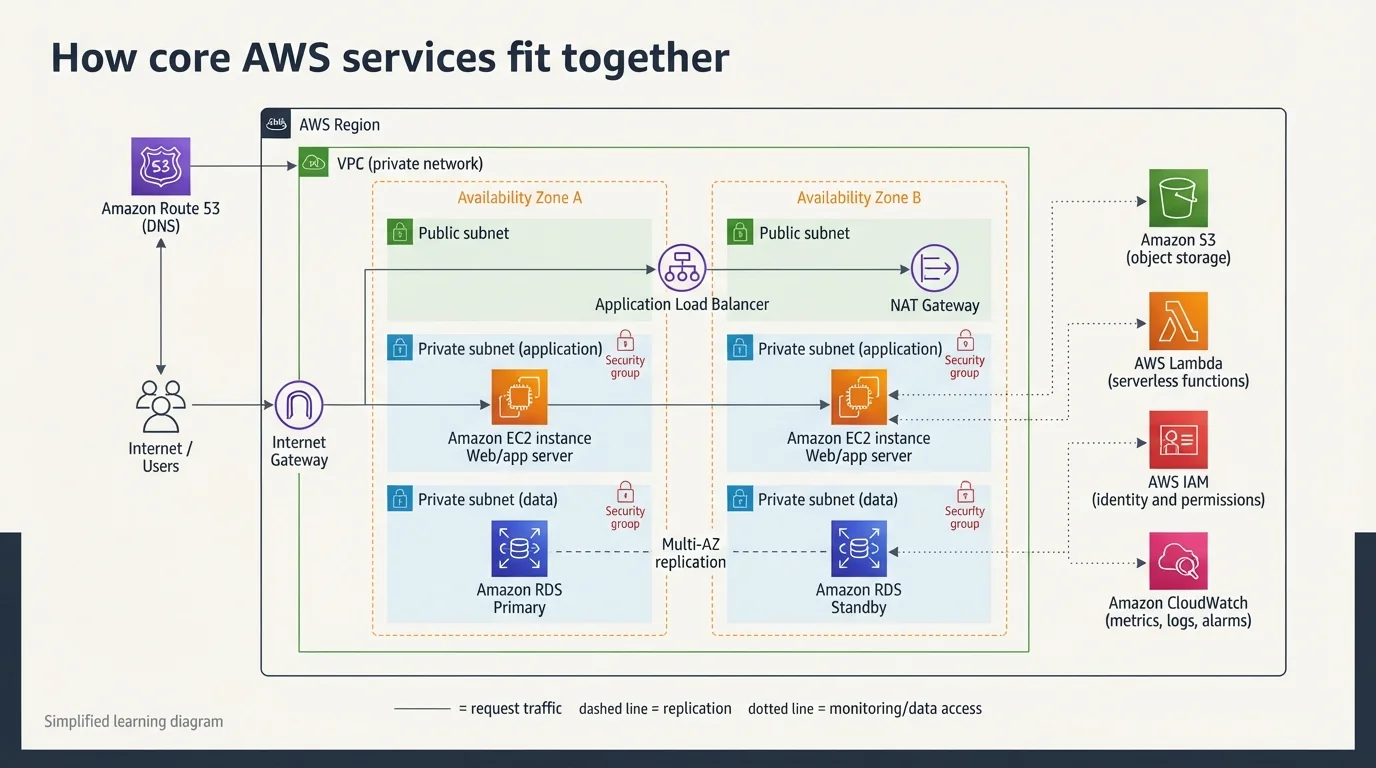
AWS has a very large catalogue. You do not need all of it. Most beginner and intermediate projects use a core set in five groups: compute, storage, networking, databases and security, plus monitoring to see what is happening. The diagram below shows how these typical building blocks fit inside a VPC across two Availability Zones.
Compute: where your code runs
Amazon EC2 provides virtual servers. You choose an operating system and instance size, and you manage the OS and applications. Example: a small web server. Banking use: hosting a legacy application that cannot easily be containerised. The lesson on hosting options compared compares EC2, containers, Elastic Beanstalk and Lambda for the same application.
AWS Lambda runs code in response to events without you managing servers, billing by invocation and duration. Example: resize an image when it is uploaded to S3. Banking use: validating a payment request or sending a transaction notification. See Lambda with C# for a worked example (the concepts apply to other languages).
Amazon ECS and Amazon EKS run containers. ECS is AWS's own container orchestrator, often used with the serverless Fargate compute engine; EKS runs managed Kubernetes. Banking use: long-running microservices such as an account service.
Storage
- Amazon S3 is object storage for files, backups, logs and static websites. Block Public Access is on by default for new buckets, which you should keep on (docs). Banking use: encrypted statement archives and audit-log retention.
- Amazon EBS provides block volumes attached to a single EC2 instance, like a virtual disk.
- Amazon EFS provides a shared network file system that many instances can mount at once.
Networking: how everything is connected
An Amazon VPC is your private, logically isolated network. Inside it you create:
- Subnets, either public (route to the internet) or private (no direct inbound internet access);
- an Internet Gateway for public internet access;
- a NAT Gateway so private resources can make outbound requests (note that NAT Gateways are billed hourly plus per GB, so check VPC pricing);
- Route tables that decide where traffic goes;
- Security groups, stateful firewalls attached to resources.
Add Elastic Load Balancing to distribute traffic across instances in several AZs, and Amazon Route 53 for DNS and health-based routing. If you only study one area deeply, make it networking: start with VPC fundamentals, then learn the difference between public, private and isolated subnets and between security groups and network ACLs.
Databases
| Service | Type | Good for | Banking-style example |
|---|---|---|---|
| Amazon RDS | Managed relational (MySQL, PostgreSQL, SQL Server and others) | Familiar SQL applications | Customer profile and product data |
| Amazon Aurora | Cloud-built MySQL/PostgreSQL-compatible | High availability and read scaling | Transactional account data |
| Amazon DynamoDB | Key-value / document NoSQL | Very high-scale, low-latency lookups | Idempotency keys, session and event state |
Picking the wrong store is a common mistake. The lesson on choosing between SQL and NoSQL on AWS gives a decision framework. For DynamoDB specifically, learn conditional writes and transactions early, because they are how you prevent duplicate updates.
Security
- AWS IAM controls who or what can do what. Start with IAM in depth.
- AWS KMS manages encryption keys. See KMS and envelope encryption.
- AWS Secrets Manager stores and rotates credentials such as database passwords.
- AWS CloudTrail records API activity for auditing. See CloudTrail for banks.
- AWS WAF filters malicious web requests at the edge. See AWS WAF and Shield.
Monitoring and management
Amazon CloudWatch collects metrics, logs and alarms (overview). AWS Config records resource configuration and checks it against rules. AWS Systems Manager helps you operate instances, including Session Manager for shell access without opening inbound ports. For a deeper look, see CloudWatch metrics and custom metrics.
Build Your First AWS Cloud Environment
This walkthrough builds a small, safe environment: one VPC, one web server, one S3 bucket and a monitoring alarm. It should cost little or nothing within current free-plan limits, but you are responsible for checking charges, so follow the clean-up step at the end.
Security warning: do not open SSH (port 22) or RDP (port 3389) to
0.0.0.0/0. Automated scanners find exposed ports within minutes. The steps below use browser-based access instead.
- Create and secure the account. Sign up, then immediately protect the root user with a strong unique password and MFA. Follow the secure your AWS account lesson. For daily work, use an administrative identity (IAM Identity Center or an IAM role), not the root user.
- Enable MFA. AWS documents the options in Multi-factor authentication in IAM. Use an authenticator app or a security key.
- Set billing alerts and a budget. Create a monthly budget with email alerts at a low threshold using AWS Budgets. Do this before you launch anything.
- Create a VPC. In the VPC console, choose Create VPC and use the "VPC and more" option with two AZs, one public and one private subnet per AZ. Choose no NAT Gateway for this exercise, because NAT Gateways add hourly cost. Background: What is Amazon VPC?
- Use a public subnet. The wizard in step 4 already creates the subnets, route tables and an Internet Gateway. Confirm that the public subnet's route table has a route to the Internet Gateway and the private subnet's does not.
- Launch an EC2 instance. Pick an Amazon Linux image and an instance type marked Free Tier eligible, place it in the public subnet, and attach an IAM role with the
AmazonSSMManagedInstanceCorepolicy so Session Manager works. See the EC2 getting started guide. - Configure the security group safely. Allow inbound HTTP (port 80) from anywhere only if you want a public demo page, and allow no inbound SSH or RDP at all. Reference: security group rules.
- Connect to the instance. Use AWS Systems Manager Session Manager or EC2 Instance Connect. If you must use SSH, restrict it to your own IP address as a /32 and remove the rule afterwards.
-
Deploy a simple web application. In the instance's user data (or an interactive session) install a web server and publish a test page, for example:
bash
sudo dnf install -y nginx
echo "<h1>Hello from my first AWS environment</h1>" | sudo tee /usr/share/nginx/html/index.html
sudo systemctl enable --now nginx
Visit the instance's public address in a browser to confirm it works. 10. Store files in S3. Create a bucket with Block Public Access left on and default encryption enabled. Upload a file, then give the instance role read access to that one bucket and test it from a Session Manager shell. 11. Monitor with CloudWatch. Open the instance's metrics (basic monitoring reports at five-minute intervals), then create an alarm on CPU utilisation that notifies an email address, following Create an alarm that sends email. 12. Clean up. Terminate the instance, empty and delete the S3 bucket, delete the VPC (which removes its subnets and gateways), release any Elastic IP addresses, and delete the alarm. Then run the checklist in teardown discipline and check the billing dashboard the next day.
To go deeper on the networking part, the tutorial site's lab on proving a database cannot be reached from the internet is a natural next step.
Real-World AWS Banking Example: How a Bank Could Use AWS
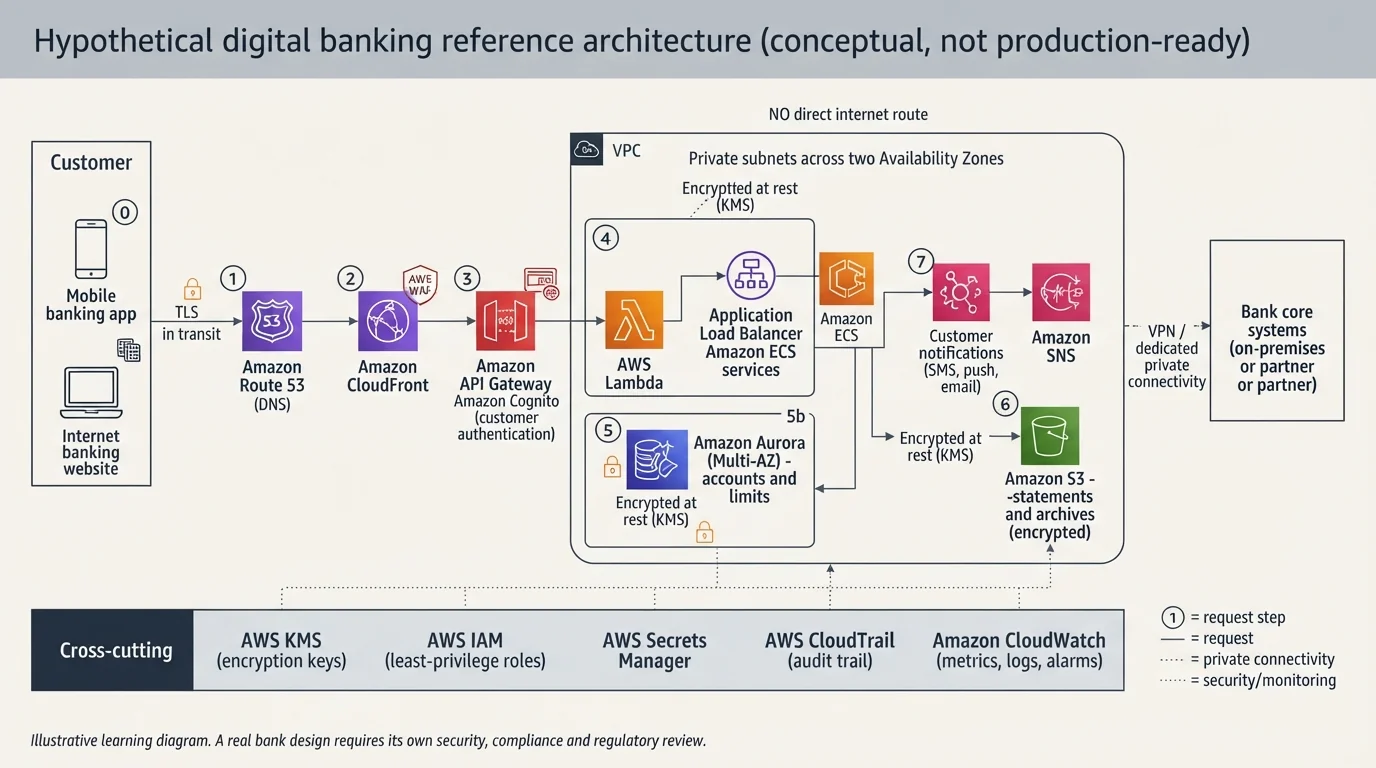
Important: everything in this section is a hypothetical, conceptual reference architecture written for learning. It is not a production-ready banking design, it is not based on a specific customer, and it omits many controls a real bank would require. AWS does not automatically make a workload compliant with banking regulations. The bank remains responsible for its security controls, governance, configuration and legal obligations.
Imagine a mid-sized retail bank launching a new digital channel: a mobile app and an internet banking site. Customers log in, check balances, view transactions and make payments. The bank's long-standing core banking system continues to hold the official books of record; the new channel layer on AWS handles customer interactions and orchestrates calls to the core.
The building blocks
| Layer | Services | Purpose |
|---|---|---|
| Edge | Amazon Route 53, Amazon CloudFront, AWS WAF | DNS, caching and DDoS/web attack filtering |
| API | Amazon API Gateway, Amazon Cognito | Entry point, throttling, customer authentication |
| Compute | AWS Lambda and/or Amazon ECS on private subnets behind an Application Load Balancer | Business logic |
| Data | Amazon Aurora (or RDS), Amazon DynamoDB, Amazon S3 | Relational data, idempotency and event state, document archives |
| Security | AWS IAM, AWS KMS, AWS Secrets Manager | Access control, encryption keys, credentials |
| Observability | AWS CloudTrail, Amazon CloudWatch | Audit trail, metrics, logs, alarms |
Request flow, step by step
Consider a customer who taps "Pay" in the mobile app.
- DNS: the app resolves the API hostname through Route 53.
- Edge protection: the request hits CloudFront, where AWS WAF rules block known bad patterns and apply rate limits. TLS terminates here.
- Authentication: API Gateway validates the customer's token (for example one issued by Amazon Cognito) and applies throttling. See API Gateway REST, HTTP and WebSocket APIs.
- Business logic: API Gateway invokes a Lambda function, or routes through a private connection to an ALB fronting ECS services in private subnets. Neither is directly reachable from the internet.
- Idempotency check: the service writes the payment request's unique key to DynamoDB with a conditional write. If the customer's phone retries after a timeout, the duplicate is detected instead of paying twice.
- Validation and data access: the service checks limits and ownership against Aurora in a private subnet, using credentials fetched from Secrets Manager, never stored in code.
- Hand-off: the payment instruction goes to the bank's payment and core systems over private connectivity (for example a VPN or dedicated connection) and the result is recorded.
- Events: a "payment completed" event is published to an event bus or queue, which triggers notifications (SMS, push, email) and downstream reporting without slowing the customer's response.
- Audit and monitoring: every control-plane action is recorded by CloudTrail, and application metrics, logs and alarms flow into CloudWatch.
Customer app
    │  HTTPS
    ▼
Route 53 ─► CloudFront + AWS WAF ─► API Gateway (auth, throttling)
                                        │
                      ┌─────────────────┴───────────────┐
                      ▼                                 ▼
                 Lambda  or  ALB ► ECS (private subnets, 2+ AZs)
                      │
        ┌─────────────┼───────────────┬─────────────┐
        ▼             ▼               ▼             ▼
    DynamoDB       Aurora (Multi-AZ)   S3 (encrypted) Event bus/queue ─► notifications
 (idempotency)   (accounts, limits)   (statements)
        ▲  encryption: KMS keys     identity: IAM roles
        └─ audit: CloudTrail   monitoring: CloudWatch
For a deeper look at how banking platforms are decomposed, see the tutorial site's lessons on the digital banking platform and payment processing.
Security and resilience themes
- Encryption in transit and at rest: TLS between the customer, the edge, and internal hops; KMS-managed keys for databases, S3 and backups. Customer-managed keys let the bank control key policies and rotation. See KMS and envelope encryption and the AWS KMS overview.
- Identity and access: least-privilege IAM roles for every service, no long-lived access keys, separation of duties between developers and production operators.
- Network segmentation: separate public, application and data subnets; security groups that reference each other; no direct internet route to databases.
- Audit logging: CloudTrail across all accounts, delivered to a protected log-archive account, with retention rules set by the bank's policy (CloudTrail user guide).
- High availability: at least two AZs for compute and a Multi-AZ database configuration (Aurora high availability).
- Disaster recovery and backup: automated backups, cross-Region copies, and a DR strategy chosen from recovery time and recovery point targets. AWS describes the options in its disaster recovery whitepaper, and the tutorial site explains the four DR strategies.
- Monitoring and incident response: alarms on error rates, latency and unusual activity, plus a rehearsed incident runbook.
- Regulatory and compliance: AWS publishes third-party audit reports through AWS Artifact, and PCI DSS is maintained by the PCI Security Standards Council. Those reports describe AWS's controls, not yours. AWS also publishes a Financial Services Industry Lens for the Well-Architected Framework. For how PCI DSS responsibilities divide in practice, see the tutorial site's PCI DSS on AWS lesson. Always involve your compliance and legal teams.
What this example leaves out
A production bank would also need multi-account governance, a central network and security tooling, formal threat modelling, penetration testing, fraud controls, data residency analysis, third-party risk management, tested rollback procedures and regulator engagement. Treat the diagram as a vocabulary lesson, not a blueprint.
Practical Banking Use Cases on AWS
| Use case | Problem | Typical AWS services | Approach | Benefit |
|---|---|---|---|---|
| Digital banking apps | Customers expect always-on mobile and web banking | Route 53, CloudFront, WAF, API Gateway, Lambda/ECS, Aurora | Layered, stateless services across AZs | Faster releases, elastic capacity |
| Fraud detection | Suspicious transactions must be flagged quickly | Amazon Kinesis Data Streams, Lambda, DynamoDB, a scoring model (for example hosted on Amazon SageMaker) | Stream transactions, score them, hold or alert on high-risk ones | Near-real-time decisions |
| Payment and event processing | Payments must not be lost or duplicated | SQS, SNS, EventBridge, Step Functions, DynamoDB | Idempotent handlers, retries, dead-letter queues, saga pattern | Reliable, decoupled processing |
| Analytics and reporting | Data is siloed and reports are slow | S3 data lake, AWS Glue, Amazon Athena, Amazon Redshift | Land data in S3, catalogue it, query in place | Faster insight and regulatory reporting |
| DR and continuity | Outages are costly and regulated | AWS Backup, Aurora, Route 53, cross-Region replication | Pick a strategy from backup/restore to active-active | Measurable recovery times |
Digital banking. The flow above is the pattern. The tutorial site's digital banking platform lesson goes further.
Fraud detection. Transaction events arrive on a stream, a function enriches each one with recent history, and a model produces a risk score. High scores trigger a step-up verification or a hold for review. Detection logic and thresholds are a business and data-science decision; AWS provides the plumbing.
Payment processing. The critical idea is that networks fail and clients retry, so every step must be safe to repeat. Queues buffer work, dead-letter queues capture failures, and a state machine coordinates multi-step payments with compensating actions. Amazon SQS and SNS are the usual building blocks.
Analytics and reporting. Transaction and operational data lands in S3, is catalogued, and is queried with serverless SQL, with access controlled at table and column level. Regulatory reporting adds lineage and reproducibility requirements.
Disaster recovery and business continuity. The bank decides how much downtime (RTO) and data loss (RPO) it can tolerate per system, then matches a DR strategy to cost. A restore that has never been tested is only a hope, so test it.
AWS Security: What Every Learner Must Know
Security is not a final chapter. Learn it from day one. The AWS Security site is the official starting point.
- Least-privilege IAM: grant only the actions and resources a role needs. Prefer roles with temporary credentials over long-lived access keys. Practise writing and tightening policies rather than only reading them.
- MFA: require it for the root user and all human access.
- Encryption: encrypt data at rest and in transit by default.
- KMS: know the difference between AWS-managed and customer-managed keys and who can use each.
- Secrets management: never put passwords or API keys in code or images. Use Secrets Manager and Parameter Store.
- Network security: private subnets for data stores, tight security groups, no open management ports.
- Logging and monitoring: enable CloudTrail and alarms before an incident, not after.
- Backup and recovery: automate backups and test restores.
- Shared Responsibility: know which controls are yours for each service you use.
AWS Hands-On Projects to Build Your Skills
| # | Project | Difficulty | Services |
|---|---|---|---|
| 1 | Static website with S3 and CloudFront | Beginner | S3, CloudFront, Route 53 |
| 2 | Web application on EC2 | Beginner–intermediate | EC2, VPC, security groups, CloudWatch |
| 3 | Serverless app with Lambda and API Gateway | Intermediate | Lambda, API Gateway, DynamoDB |
| 4 | Secure three-tier architecture | Intermediate–advanced | VPC, ALB, EC2/ECS, RDS, NAT, WAF |
| 5 | Simplified banking transaction system | Advanced | API Gateway, Lambda, SQS/SNS, DynamoDB, Aurora, KMS |
- Static website (S3 + CloudFront). Objectives: learn bucket policies, origin access control, caching and HTTPS. Outcome: a fast, HTTPS-served site with no servers. Start with the S3 documentation.
- Web app on EC2. Objectives: networking, security groups, instance roles, monitoring. Outcome: the environment you built earlier in this guide, extended with a load balancer. See hosting options compared.
- Serverless app. Objectives: event-driven design, API authorisation, pay-per-use. Outcome: a REST API backed by a function and a table. Use the Lambda lesson and API Gateway lesson.
- Three-tier architecture. Objectives: segmentation, multi-AZ design, secrets and encryption. Outcome: a web tier, an app tier and a database tier where only the web tier is internet-facing. The tutorial site's capstone projects include a highly available banking application that follows this shape.
- Banking transaction system. Objectives: idempotency, retries, auditability, failure handling. Outcome: a simplified transfer service that survives duplicates and partial failures. Use fake data only.
AWS Learning Resources and Certifications
Official resources: AWS Skill Builder (courses and practice), AWS Documentation, AWS Workshops, the Well-Architected Framework, the AWS Architecture Center and AWS Training and Certification.
Which AWS certification should you start with?
Certification names and exam versions change, so confirm details on the AWS Certification page and the exam guides before registering. As of November 2026:
| Certification | Level | Focus | Typical audience | Exam basics (AWS pages) |
|---|---|---|---|---|
| AWS Certified Cloud Practitioner | Foundational | Cloud concepts, core services, pricing, security basics | Newcomers, non-technical roles | 65 questions, 90 minutes, USD 100 |
| AWS Certified Solutions Architect – Associate | Associate | Designing resilient, secure, cost-effective architectures | Aspiring architects, engineers | 65 questions, 130 minutes, USD 150 |
| AWS Certified Developer – Associate | Associate | Building, deploying and debugging cloud applications | Developers | 65 questions, 130 minutes, USD 150 |
| AWS Certified CloudOps Engineer – Associate (the renamed successor to SysOps Administrator – Associate, exam SOA-C03) | Associate | Deploying, operating, monitoring and troubleshooting workloads | Sysadmins, operations engineers | 65 questions, 130 minutes, USD 150 |
Prices exclude possible taxes and currency charges. AWS recommends roughly a year of hands-on AWS experience for the associate exams and no prerequisite for Cloud Practitioner. The tutorial site's certification roadmap suggests an exam order and notes recent changes, including the SysOps-to-CloudOps rename.
Common AWS Learning Mistakes
- Learning services without architecture. Knowing what EC2 and S3 are is not the same as knowing when to use each. Draw the whole system before you build.
- Ignoring networking. Most "it doesn't work" problems are routing, DNS or firewall problems.
- Poor IAM practices. Using admin permissions everywhere, or sharing access keys, builds bad habits.
- Forgetting cost management. Set a budget first and clean up after every session.
- Skipping practical projects. Reading does not create muscle memory.
- Relying entirely on certification videos. Exams test recognition; jobs test problem solving.
- Not learning to troubleshoot. Read error messages, CloudTrail events and logs.
- Treating security and monitoring as optional. Add them to every project.
A 30-Day AWS Learning Plan
This assumes about 8–10 hours per week and is a starting framework, not a promise of job readiness.
| Week | Focus | Measurable goals | Outcome |
|---|---|---|---|
| 1 | Cloud fundamentals and AWS basics | Explain IaaS/PaaS/SaaS, Regions and AZs, Shared Responsibility; secure your account; set a budget | A protected account and a notes page of key terms |
| 2 | Compute, storage and networking | Launch an EC2 web server, create an S3 bucket, build a VPC with public and private subnets | The first-environment walkthrough completed and torn down |
| 3 | Databases, IAM and security | Create an RDS or DynamoDB table, write a least-privilege IAM policy, enable CloudTrail, use KMS encryption | A private database reachable only from your app tier |
| 4 | Hands-on project and revision | Build a three-tier or serverless project, add alarms, write a one-page architecture summary | A documented project you can show others, plus a gap list for the next month |
Conclusion: Start Building Your AWS Skills
AWS is worth learning because the same core ideas, networks, identities, compute, storage, data and monitoring, show up in almost every cloud project. The fastest way to absorb them is to build small things, break them safely, and clean them up. Studying real architectures, including the hypothetical banking example above, teaches you why design choices are made, not just which service to click.
For next steps, you can follow the structured curriculum and roadmap on the tutorial site, or pick a capstone project that matches your level. Whichever route you choose, start with account security and a budget, then build.
Frequently Asked Questions About Learning AWS
What is AWS and how does it work?
AWS is Amazon's cloud platform. It runs large fleets of servers, storage and networks in data centres around the world and lets you rent slices of them as services over the internet. You create resources through a console, CLI or API and are billed for usage. AWS secures the underlying infrastructure; you secure what you build on it.
How can a beginner start learning AWS?
Learn basic networking and Linux, create a secured account with MFA and a budget, then build a small environment: a VPC, an EC2 web server, an S3 bucket and a CloudWatch alarm. Use AWS Skill Builder and documentation alongside hands-on labs, and delete resources after each session to avoid unexpected charges.
Can I learn AWS without programming?
Yes, for foundational and operations-focused paths. You can learn core services, networking, security and the console without coding, and the Cloud Practitioner certification does not require it. Basic scripting becomes important for automation, infrastructure as code, serverless development and troubleshooting, so plan to pick up Python, Bash or a similar language over time.
Which AWS services should beginners learn first?
Start with IAM for access control, EC2 for virtual servers, S3 for storage, VPC for networking, and CloudWatch for monitoring. Then add a database service such as RDS or DynamoDB, Route 53 for DNS, and Lambda for serverless. This set covers the concepts that most other AWS services build on.
How is AWS used in banking?
Banks use AWS for digital channels, APIs, analytics, fraud detection, payment event processing and disaster recovery, often alongside existing on-premises core systems. Typical designs combine private networking, encryption with managed keys, detailed audit logging and multi-AZ resilience. Each bank remains responsible for its own controls and regulatory compliance.
Is AWS suitable for financial applications?
AWS offers security features, audit reports and architecture guidance used by many regulated organisations, including a Financial Services Industry Lens for the Well-Architected Framework. Suitability depends on your design, configuration, governance and regulator expectations. AWS compliance reports cover AWS's part of the Shared Responsibility Model, not your workload automatically.
How much does it cost to learn AWS?
It can cost little or nothing if you use the current free plan, stay within limits, set budgets and delete resources after each lab. Costs vary and terms change, so read the current AWS Free Tier page. Common surprises come from forgotten NAT Gateways, load balancers, public IPv4 addresses and databases left running.
Which AWS certification should I start with?
If you are new to cloud or to IT, Cloud Practitioner is the gentlest start. If you already have some hands-on IT experience and want to design systems, Solutions Architect – Associate is a popular choice. Developers may prefer Developer – Associate; operations staff may prefer CloudOps Engineer – Associate. Check AWS for the current exam versions.
How long does it take to learn AWS?
It depends on your background and weekly study time. A focused beginner can grasp the fundamentals and build a first project in about a month, as in the plan above. Becoming comfortable designing secure, production-grade architectures typically takes many months of practice. The tutorial site's own full roadmap is estimated in hundreds of hours.
What practical AWS projects should I build?
Start with a static website on S3 and CloudFront, then an EC2 web app, a serverless API with Lambda and API Gateway, and a secure three-tier architecture. Finish with a simplified transaction-processing system using queues, idempotent handlers and encryption. Document each project with a diagram and a short explanation of your design choices.
The banking scenarios in this article are hypothetical illustrations for education. They do not describe a real bank, a real customer, or a production-ready system, and they are not legal, compliance or investment advice.

Abrar Sohail
Digital marketing professional with 16+ years in growth hacking, AI, and e-commerce. Focused on scaling brands through innovative and measurable strategies.
